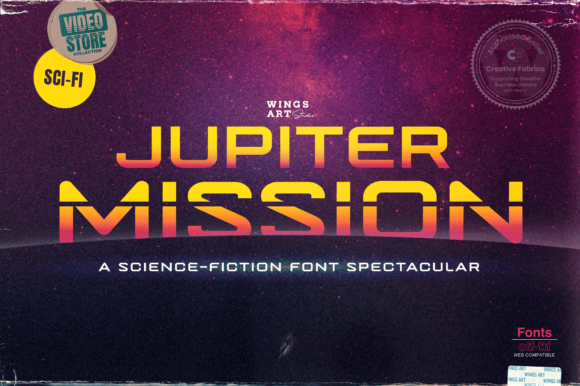
Why Jupiter Mission Is the Bold Choice for Futuristic Web Designs
In a digital landscape saturated with safe, predictable typography, Jupiter Mission stands out as a deliberate statement. It is not merely a font; it is a visual cue that signals innovation, technology, and forward-thinking design. For professionals ranging from web designers to entrepreneurs, selecting the right typeface can be the difference between a project that feels dated and one that captures immediate attention. However, the allure of a bold, futuristic aesthetic often leads to hasty decisions that compromise readability or brand coherence.
Many creators are drawn to Jupiter Mission because of its striking techno touch. Yet, without a strategic approach, this powerful display font can quickly become an obstacle rather than an asset. Understanding the nuances of how to apply this specific typeface is crucial for anyone looking to elevate their business cards, website headers, or marketing materials. The goal is not just to use a cool-looking font, but to ensure that the typography serves the communication effectively.
The Allure and the Trap of Display Fonts
When you first encounter Jupiter Mission, the primary appeal is its distinct character. It possesses a modern edge that fits perfectly within themes involving space exploration, software development, or high-tech startups. This makes it an excellent candidate for headlines, logos, and short promotional text where impact is paramount. However, the mistake many beginners make is assuming that a font designed for "display" purposes works equally well for body copy.
Using Jupiter Mission for long paragraphs of text is a common error that undermines usability. Its intricate details and heavy weight are optimized for short bursts of information, not for extended reading. When readers are forced to parse dense blocks of this typeface, cognitive load increases, leading to fatigue and disengagement. The result is a poor user experience where the message gets lost in the style. To avoid this, always reserve Jupiter Mission for titles, captions, and key phrases, pairing it with a clean, neutral sans-serif for the main content.
Pitfalls in Downloading and Licensing
Before you even open your design software, there are critical steps regarding acquisition that often get overlooked. The internet is filled with free font repositories, but not all sources provide legitimate licenses for commercial use. A significant number of users inadvertently download pirated versions of Jupiter Mission, which can lead to legal complications and financial penalties down the line.
- Verify the Source: Always purchase or download fonts from reputable foundries or official marketplaces. Avoid sketchy file-sharing sites that may bundle malware with the font files.
- Check the License Terms: Just because a font is free does not mean it is free for commercial projects. Ensure the license explicitly covers web usage, print runs, and client work if you are a freelancer or agency.
- File Integrity: Corrupted font files can cause rendering issues in your design software or on live websites. Verify that the file extension matches your operating system requirements (e.g., .otf vs .ttf).
Neglecting these checks can result in costly rebranding efforts or legal notices. Furthermore, using an unverified version might mean missing out on proper character sets or language support, which limits your ability to communicate with a global audience.
Technical Considerations for Web Implementation
For web designers, integrating Jupiter Mission requires more than just adding a CSS rule. There are technical constraints that affect loading speeds and cross-browser compatibility. Unlike standard system fonts, custom display fonts must be loaded via @font-face, which adds HTTP requests to your page. If not optimized, this can slow down your site's performance, negatively impacting SEO rankings and user retention.
A frequent oversight is failing to provide fallback fonts. If a user's device does not have Jupiter Mission installed and the web font fails to load due to a connection issue, the text might revert to a default serif font like Times New Roman, completely ruining the intended futuristic aesthetic. Always specify a robust font stack in your CSS, ensuring that a similar geometric sans-serif is available as a backup.
- Optimize File Sizes: Use tools to subset your font files, removing unused characters to reduce file size without losing essential glyphs.
- Implement Font Loading Strategies: Utilize the
font-display: swapproperty to ensure text remains visible immediately, even if the custom font takes a moment to render. - Test Across Browsers: Different browsers handle custom fonts differently. Test your implementation on Chrome, Safari, Firefox, and Edge to ensure consistency.
By addressing these technical hurdles early, you ensure that the boldness of Jupiter Mission is preserved across all devices, maintaining the professional quality of your digital presence.
Contextual Misalignment in Branding
Even when the technical setup is perfect, the strategic application of Jupiter Mission can still fail if it clashes with the broader brand identity. This font carries a specific connotation: it is loud, energetic, and futuristic. Using it for a law firm, a healthcare provider, or a traditional bakery creates a dissonance that confuses potential customers. The typography should reinforce the brand story, not contradict it.
Consider the tone of your message. If your brand values warmth, community, and tradition, Jupiter Mission might feel too cold or robotic. Conversely, if you are launching a new AI startup or a gaming platform, this font is likely a perfect fit. The mistake lies in choosing a font simply because it looks "cool" without considering whether it aligns with the emotional resonance you want to evoke.
To correct this, create a mood board before finalizing your typography. Compare Jupiter Mission against other options to see if it truly offers the best balance of style and substance for your specific niche. Sometimes, a slightly softer alternative might achieve the same futuristic look while feeling more accessible to your target demographic.
Evaluating Quality Before You Commit
Finally, take the time to evaluate the actual quality of the font family you are about to use. Not all variations of Jupiter Mission are created equal. Some may have inconsistent kerning, uneven stroke widths, or poorly designed ligatures. These subtle flaws can detract from the professionalism of your design, making it appear amateurish despite the high-quality concept.
Always preview the font in various weights and styles. Check how the letters interact with each other in different sizes. A font that looks great at 72pt on a billboard might become illegible at 12pt on a mobile screen. Additionally, inspect the punctuation marks and special symbols; they are often the last thing designers check but the first thing noticed by detail-oriented viewers.
If you are unsure, start with a small test project. Apply Jupiter Mission to a mock-up of a business card or a landing page header. Ask peers or mentors for feedback on readability and aesthetic appeal. This low-risk approach allows you to identify potential issues before committing to a full-scale rebrand or a major web redesign.
By approaching Jupiter Mission with a mindset focused on practical application and careful evaluation, you transform a simple font choice into a strategic asset. Whether you are a seasoned designer or a small business owner, taking the time to understand the strengths and limitations of this typeface will ensure your projects stand out for the right reasons.