Unleashing Creativity with MultiType Pixel Wide Thin: A Guide to Distorted Digital Design
In the rapidly evolving landscape of digital design, standing out is no longer just an option; it is a necessity. As screens become more ubiquitous and attention spans shorten, designers are constantly searching for typography that commands immediate notice while retaining legibility. Enter MultiType Pixel Wide Thin, a cool, uniquely shaped, pixelated display font that has quickly become a favorite for those looking to inject a distorted and trendy touch into their projects. This isn't just another retro-style typeface; it represents a sophisticated blend of nostalgia and modern innovation.
Whether you are a graphic designer crafting a poster for a music festival, a web developer building a landing page for a tech startup, or a content creator making eye-catching social media graphics, understanding how to leverage unique fonts like this can elevate your work from standard to spectacular. In this article, we will explore what makes MultiType Pixel Wide Thin special, why its PUA encoding matters, and how you can integrate this distinctive tool into your creative workflow.
The Anatomy of a Unique Display Font
To truly appreciate MultiType Pixel Wide Thin, one must first understand the concept of "display" typography. Unlike body text fonts, which are designed for long-form reading and comfort, display fonts are meant to be seen in short bursts. They are bold, expressive, and often carry a specific mood or personality. MultiType Pixel Wide Thin fits squarely into this category, but with a twist.
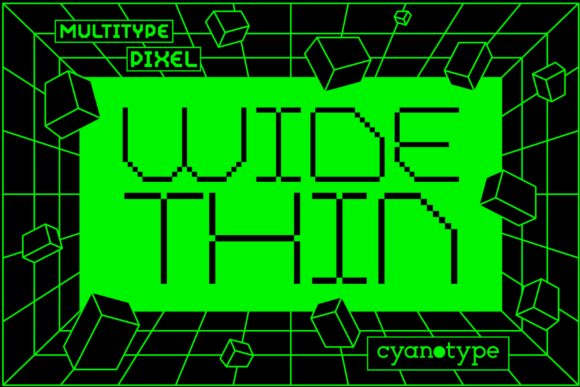
The font's name tells us much about its visual characteristics:
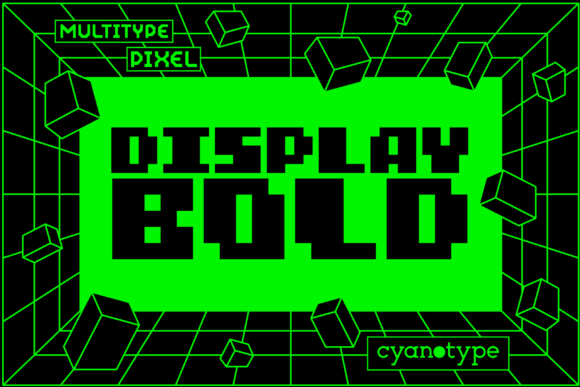
- Pixelated: It embraces the blocky aesthetic of early computer graphics, evoking memories of 8-bit video games and primitive digital interfaces.
- Wide: The characters are stretched horizontally, creating a sense of expansion and presence on the screen.
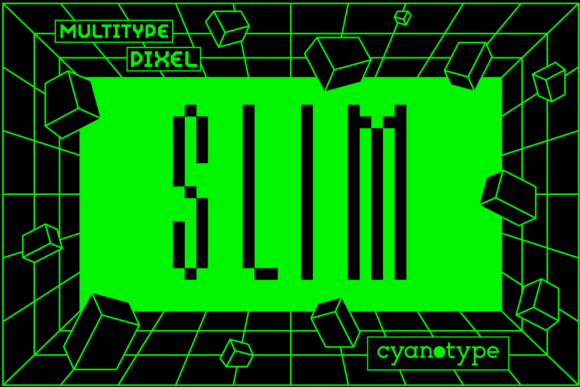
- Thin: Despite being wide, the strokes remain slender. This combination creates a delicate yet imposing silhouette that is highly readable even at large sizes.
This juxtaposition of "wide" and "thin" results in a font that feels both futuristic and vintage simultaneously. It breaks the conventional rules of proportion, offering a distorted look that appeals to audiences accustomed to glitch art and cyberpunk aesthetics.
Why Distortion Matters in Modern Design
You might wonder why a designer would intentionally choose a font that looks slightly "off" or distorted. In the context of contemporary branding and web design, distortion is a powerful tool for signaling creativity and non-conformity. When a user scrolls through a feed of perfectly balanced, corporate-looking designs, a piece of content featuring MultiType Pixel Wide Thin acts as a visual disruptor.
This disruption grabs attention. It suggests that the brand behind the message is innovative, edgy, and unafraid to break the mold. From gaming merchandise to streetwear fashion brands, this font style communicates a distinct identity. It transforms simple headlines into artistic statements, proving that typography is not just about conveying words, but also about setting a tone.
Technical Mastery: The Power of PUA Encoding
While the visual appeal of MultiType Pixel Wide Thin is undeniable, its true utility lies in its technical architecture. One of the most significant features of this font is that it is PUA encoded. For those unfamiliar with the term, PUA stands for Private Use Area. This is a reserved space within the Unicode standard where font developers can place custom glyphs without conflicting with standard character sets.
What does this mean for you, the user? It means unparalleled flexibility. Standard fonts often limit you to the basic alphabet and numbers. However, because MultiType Pixel Wide Thin utilizes the PUA, you gain access to a vast library of additional characters, including:
- Swashes and Ornamentation: Extra decorative elements that add flair to headers and titles.
- Special Symbols: Unique icons and shapes that fit the pixelated theme perfectly.
- Alternate Characters: Different versions of letters (like a 'Q' with a different tail) that allow for stylistic variation within the same word.
Accessing these glyphs is surprisingly easy once the font is installed. Instead of hunting through endless character maps, the PUA encoding allows you to map these special symbols to specific keys on your keyboard or select them directly from your font editor's glyph panel. This ease of use ensures that even beginners can incorporate complex design elements without needing advanced coding skills.
Clarifying Common Misunderstandings
A common misconception about PUA-encoded fonts is that they are difficult to share or incompatible with other software. While it is true that if you send a document containing PUA glyphs to someone who does not have the font installed, those characters may appear as boxes or errors, this is a universal issue with any custom font. The solution is straightforward: always embed the font or provide a link for download when sharing digital files. Furthermore, unlike older proprietary formats, modern web technologies and design software handle PUA fonts with high fidelity, making them a reliable choice for professional workflows.
Practical Applications in Business and Creativity
So, how do you actually use MultiType Pixel Wide Thin in real-world scenarios? Its versatility makes it suitable for a wide range of industries and applications. Let's look at some practical examples of how this font can drive engagement and communicate effectively.
Digital Marketing and Social Media
In the crowded world of social media, your thumbnail or post image needs to stop the scroll. Using MultiType Pixel Wide Thin for headlines on Instagram stories or YouTube thumbnails can create a high-contrast, energetic vibe. The thinness of the lines ensures that the text doesn't feel too heavy or cluttered, while the width fills the frame effectively. Pairing this font with vibrant colors and glitch effects can result in ad campaigns that feel native to internet culture.
Gaming and Esports Branding
The gaming industry has long embraced pixel art, but moving beyond simple 8-bit sprites into more refined typography is the current trend. MultiType Pixel Wide Thin offers a bridge between retro gaming nostalgia and modern UI design. Esports teams use this font for player names, tournament banners, and streaming overlays. The distorted nature of the letters mimics the chaotic energy of gameplay, making it a perfect match for gaming communities.
Educational Content and Tech Blogs
Even in educational settings, there is room for creativity. If you are writing a blog post about the history of technology, coding, or digital art, using MultiType Pixel Wide Thin for section headers can visually reinforce the topic. It helps break up walls of text, making the content more digestible for readers. By using the swashes and alternate glyphs provided by the PUA encoding, you can create unique bullet points or dividers that make your educational material stand out.
Integrating the Font into Your Workflow
Getting started with MultiType Pixel Wide Thin is a seamless process. Once you have acquired the font file, installation is identical to any other TrueType or OpenType font on Windows, macOS, or Linux systems. After installation, it will appear in your font menu alongside your standard typefaces.
To maximize the potential of the font, consider the following tips:
- Pairing: Because MultiType Pixel Wide Thin is so distinctive, pair it with a clean, neutral sans-serif font for body text. Fonts like Helvetica, Roboto, or Open Sans provide a calm backdrop that lets the headline shine without competing for attention.
- Spacing: The "wide" aspect of the font means you may need to adjust tracking (letter spacing). Often, adding a little extra space between letters enhances the readability of thin, wide characters.
- Color Contrast: Since the font is thin, ensure you use high contrast colors. White text on a dark background, or a bright neon color on black, works exceptionally well to maintain legibility.
Conclusion: Embracing the Unusual
In a world where design trends cycle rapidly, having a versatile and unique tool in your arsenal is invaluable. MultiType Pixel Wide Thin is more than just a font; it is a statement. It combines the nostalgic charm of pixel art with the sleek precision of modern vector design, all wrapped in a package that is easy to use thanks to its PUA encoding.
For designers seeking to add a distorted and trendy touch to their work, this font offers endless possibilities. Whether you are building a brand identity, designing a website, or creating marketing materials, MultiType Pixel Wide Thin provides the edge needed to capture attention. By understanding its capabilities and applying it thoughtfully, you can transform ordinary designs into extraordinary visual experiences. So, next time you need to make a bold statement, reach for this unusual font and let your creativity run wild.
Remember, good design is not just about following rules; it is about knowing when to bend them. With MultiType Pixel Wide Thin, you have the power to bend typography to your will, creating visuals that are memorable, engaging, and undeniably cool.